



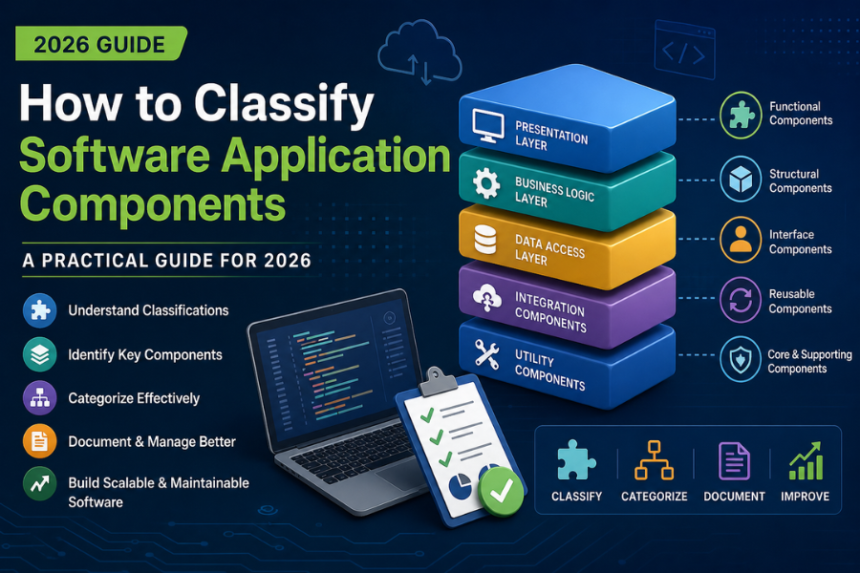
In 2026, understanding how to classify software application components is no longer just a “nice-to-have” skill. It has become an important part of modern software development. Whether you are a developer, project manager, or IT professional, proper classification helps you build systems that are easier to maintain, scale, and reuse.
When software is well-organized, teams work faster, make fewer mistakes, and handle updates more smoothly. This guide on how to classify software applications components breaks everything down in a simple way so you can understand classifications, components, and practical methods without confusion.
What Are the Classifications of Software Components?
Software components can be grouped in different ways depending on what they do and how they are used in a system. Below are some of the most common classifications used in real-world development.
1. Functional Components
These are the parts that handle specific tasks or business logic.
For example:
- Payment processing systems
- User authentication modules
- Reporting tools
They are responsible for “doing the work” inside the application.
2. Structural Components
These components support the overall architecture of the system.
Examples include:
- Database connectors
- API gateways
- Communication layers
They act as the backbone that connects different parts of the software.
3. Interface Components
These handle interaction between users or systems.
For example:
- Graphical user interfaces (GUI)
- REST APIs
- Command-line interfaces
They make communication possible between humans and machines or between systems.
4. Reusable vs Non-Reusable Components
- Reusable components can be used in multiple projects, such as logging libraries or authentication modules.
- Non-reusable components are built for a specific project and are not intended for reuse.
5. Core vs Supporting Components
- Core components are essential for the application to function.
- Supporting components assist core features but are not critical on their own.
Understanding these categories helps teams structure projects in a cleaner and more organized way.
What Are the Components of a Software Application?
To manage software effectively, it’s important to understand its internal structure. Most applications are divided into several layers or components:
Presentation Layer Components
These manage everything the user sees and interacts with, such as screens, buttons, and forms.
Business Logic Layer Components
This layer contains the rules and logic that decide how the application behaves. It handles calculations, workflows, and decision-making.
Data Access Layer Components
These components communicate with databases or storage systems to fetch and save data.
Integration Components
They connect your application with external services, APIs, or third-party tools.
Utility Components
These provide shared functions like:
- Logging
- Error handling
- Security checks
Breaking applications into these parts makes debugging easier and helps developers update specific features without affecting the whole system.
How Can You Categorize Application Software?
Application software can also be grouped in different ways depending on purpose, structure, and usage.
Based on Functionality
- System software vs application software
- Productivity, multimedia, and enterprise software
Based on Deployment
- Desktop applications
- Web applications
- Mobile applications
Based on Architecture
- Monolithic systems
- Microservices architecture
- Client-server or peer-to-peer models
Based on Licensing and Ownership
- Proprietary software
- Open-source software
- Freeware and shareware
Each type plays a different role in planning, development, and deployment.
Step-by-Step Guide to Classifying Components
If you want to apply this in a real project, here’s a simple process you can follow:
1. List All Components
Start by identifying every module, library, and service in your system.
2. Understand Their Purpose
Ask what each component does and how important it is to the application.
3. Group by Dependency
Sort components into core, supporting, and utility based on how they depend on each other.
4. Mark Reusability
Decide which components can be reused in other projects.
5. Document Everything
Keep clear documentation so the whole team can understand the structure.
This step-by-step approach helps reduce confusion and improves long-term project management.
Software Domains Where Classification Matters
Component classification is useful across many types of software systems:
- Enterprise applications – improves modular design in large systems like ERP and CRM
- Mobile apps – helps manage performance and resource usage
- Web applications – supports API-based and microservice structures
- Embedded systems – separates hardware-level logic from software functions
In all cases, proper classification improves scalability and makes testing easier.
Classification Based on Licensing
Licensing is another important factor when working with software components:
- Proprietary components – closed-source and restricted use
- Open-source components – freely available with license conditions (MIT, GPL, etc.)
- Third-party licensed components – require payment or subscription
Understanding licenses helps avoid legal issues and ensures proper usage of external tools and libraries.
Tools That Help with Component Classification
Several tools can make classification and management much easier:
- Dependency tools: npm, Maven, Gradle
- Architecture tools: UML diagrams, C4 model, ArchiMate
- Code analysis tools: SonarQube, ESLint, Checkmarx
- Documentation tools: Confluence, Notion
These tools help teams visualize structure, track dependencies, and maintain clarity.
FAQs
Why is classifying software components important?
It helps improve organization, reduce errors, and make software easier to maintain and scale.
Can one component belong to multiple categories?
Yes. For example, a logging module can be both reusable and a utility component.
Does licensing affect classification?
Yes. Licensing determines how components can be used, shared, or modified.
Is there a standard classification system?
There is no single global standard, but most teams follow modular design or microservices principles.
Conclusion
Learning how to classify software application components is an essential skill for anyone working in software development today. It helps you understand how systems are built, how parts connect, and how to manage complexity effectively.
When you clearly identify software components, categorize them properly, and document everything, you create systems that are easier to maintain, scale, and improve over time.
In modern development, good structure is just as important as good code—and classification is where that structure begins.